pollurl = "https://pollev.com/davidahirshberg"
lecture = function(n, id=NULL) {
    if(is.null(id)) {
        sprintf("https://qtm285-1.github.io/assets/lectures/Lecture%d.html", n) }
    else {
        sprintf("https://qtm285-1.github.io/assets/lectures/Lecture%d.html#%s", n, id)
    }
}
homework = function(n, id=NULL) {
    if(is.null(id)) {
        sprintf("https://qtm285-1.github.io/assets/homework/week%d-homework.html", n) }
    else {
        sprintf("https://qtm285-1.github.io/assets/homework/week%d-homework.html#%s", n, id)
    }
}Homework: Bootstrap
class.theme = theme(plot.background = element_rect(fill = "transparent", colour = NA),
        panel.background = element_rect(fill = "transparent", colour = NA),
                    legend.background = element_rect(fill="transparent", colour = NA),
                    legend.box.background = element_rect(fill="transparent", colour = NA),
                    legend.key = element_rect(fill="transparent", colour = NA),
        axis.ticks.x = element_blank(),
        axis.ticks.y = element_blank(),
        axis.text.x  = element_text(colour = "#aaaaaa"),
        axis.text.y  = element_text(colour = "#aaaaaa"),
        axis.title.x  = element_text(colour = "#aaaaaa"),
        axis.title.y  = element_text(colour = "#aaaaaa", angle=90)
)

theme_set(class.theme)
theme_update(axis.title.x  = element_blank(),
             axis.title.y  = element_blank())
simplified.theme = theme_get()

theme_update(axis.text.x   = element_blank(),
              axis.text.y   = element_blank())
blank.theme = theme_get()

theme_update(panel.grid.major=element_line(color=rgb(1,0,0,.1,  maxColorValue=1)),
           panel.grid.minor=element_line(color=rgb(0,1,0,.1, maxColorValue=1)))
grid.theme = theme_get()

whitebg.theme = function(lightgray="#cccccc", gridcolor=rgb(0,0,0,.07, maxColorValue=1), labs=FALSE) {
    theme(
        plot.background = element_rect(fill = "transparent", colour = NA),
        panel.background = element_rect(fill = "transparent", colour = NA),
                    legend.background = element_rect(fill="transparent", colour = NA),
                    legend.box.background = element_rect(fill="transparent", colour = NA),
                    legend.key = element_rect(fill="transparent", colour = NA),
        axis.ticks.x = element_blank(),
        axis.ticks.y = element_blank(),
        axis.text.x  = element_text(colour = lightgray),
        axis.text.y  = element_text(colour = lightgray),
        axis.title.x  = if(labs) { element_text(colour=lightgray) } else { element_blank() },
        axis.title.y  = if(labs) { element_text(colour=lightgray, angle=90) } else { element_blank() },
        panel.grid.major=element_line(colour=gridcolor),
        panel.grid.minor=element_line(colour=gridcolor, linewidth=0.25))
}
labs = function(...) { list(ggplot2::labs(...), whitebg.theme(labs=TRUE)) }
whitebw.theme = whitebg.theme

# Plots without labs() inherit the global theme: leave it on class.theme, not the debug grid above.
theme_set(class.theme)
# These are the HTML entities for shapes we use in the text.
# This lets us write `r circle` instead of ● when we want a circle.
triangle = '▲'
circle = '●'
pointrange = '⍿'
filled = list(
downtriangle = 25,
uptriangle = 24,
diamond = 23,
square = 22,
circle = 21)
comparison_styles = list(
scale_shape_manual(values=c('0'=filled$downtriangle, '1'=filled$uptriangle)),
guides(shape='none', color='none', fill='none'))twocolor.red = rgb(248,118,109, maxColorValue=255)
twocolor.green = rgb(0,191,196, maxColorValue=255)
groupa = twocolor.red
groupb = twocolor.green
pink = '#ef476f' # rgb(239,71,111)
mustard = '#ffd166' # rgb(255,209,102)
green = '#06d6a0' # rgb(6, 214,160)
teal = '#118ab2' # rgb(17,138,178)
midnight = '#073b4c' # rgb(7,59,76)
# fwiw, col2rgb is a function that converts a color to its RGB values
map.background = green
polla = midnight
pollb = pink
pollc = teal
polld = green
polle = mustard
# THESE COLORS ARE DEFINED IN class.scss, TOO. IF YOU CHANGE THEM HERE, CHANGE THEM THERE.$$ \newcommand{X}{} \newcommand{Y}{} % A hex digit after # inside a macro body is eaten by build-time expansion, so digit-leading hexes spell # via .
$$
ellipsis = function(df, nhead=5L, ntail=2) {
    rownames(df) = if(is.null(rownames(df))) {
        as.character(1:nrow(df))
    } else {
        as.character(rownames(df))
    }
    stopifnot("data.frame" %in% class(df))
    els = rep(NA, ncol(df)) |>
        matrix(nrow=1, dimnames=list(NULL, names(df))) |>
        data.frame(stringsAsFactors=FALSE) |>
        as_tibble()
    rownames(els) = "⋮"
    dplyr::bind_rows(head(df, nhead), els, tail(df, ntail))
}
options(knitr.kable.NA = '')
with_seed = function(x, seed=default.seed) {
had_seed = exists(".Random.seed", envir=.GlobalEnv, inherits=FALSE)
if(had_seed) {
old_seed = get(".Random.seed", envir=.GlobalEnv, inherits=FALSE)
}
on.exit({
if(had_seed) {
assign(".Random.seed", old_seed, envir=.GlobalEnv)
} else if(exists(".Random.seed", envir=.GlobalEnv, inherits=FALSE)) {
rm(".Random.seed", envir=.GlobalEnv)
}
}, add=TRUE)
set.seed(seed)
force(x)
}set.seed(1)
sample(1:5)
sample(1:5)
set.seed(1)
sample(1:5)
sample(1:5) |> with_seed(1)
sample(1:5)mean_sd = function(x, mult = 1) { mean_se(x, mult = mult*sqrt(length(stats::na.omit(x)))) }summary.lookup = function(column.name, summaries, default=NA) {
function(w,x) {
out = left_join(data.frame(w=w,x=x),
summaries[, c('w','x',column.name)],
by=c('w','x')) |>
pull(column.name)
out[is.na(out)] = default
out
}
}coarsen = function(x, group, seed=0) {
({
x.coarsened = rep(NA, length(x))
for(gg in unique(group)) {
x.coarsened[group==gg] = runif(sum(group==gg), min(x[group==gg]), max(x[group==gg]))
}
x.coarsened
}) |> with_seed(seed)
} binary.search = function(f, target, limits, steps = 50) {
for(i in 1:steps) {
middle = mean(limits)
if(f(middle) < target) limits[1] = middle else limits[2] = middle
}
limits[2]
}
width = function(draws, center = mean(draws), alpha = .05) {
coverage = function(w) {
mean(center - w / 2 <= draws & draws <= center + w / 2)
}
binary.search(coverage, 1 - alpha,
c(0, 2 * max(abs(draws - center))))
}
# Continuous CDFs only; discrete distributions use the integer-support wrappers below.
width_cdf = function(cdf, center, limits, alpha=.05) {
coverage = function(w) {
cdf(center + w/2) - cdf(center - w/2)
}
binary.search(coverage, 1-alpha, limits)
}
width_binom = function(theta, n, alpha=.05) {
if(theta == 0 || theta == 1) { return(0) }
coverage = function(w) {
pbinom(floor(n*(theta+w/2)), n, theta) -
pbinom(ceiling(n*(theta-w/2))-1, n, theta)
}
binary.search(coverage, 1-alpha, c(0, 2*max(theta, 1-theta)))
}
width_hyper = function(theta, n, m, alpha=.05) {
if(theta == 0 || theta == 1) { return(0) }
coverage = function(w) {
phyper(floor(n*(theta+w/2)), m*theta, m*(1-theta), n) -
phyper(ceiling(n*(theta-w/2))-1, m*theta, m*(1-theta), n)
}
binary.search(coverage, 1-alpha, c(0, 2*max(theta, 1-theta)))
}default.dot.size = 2
default.highlight.colors = c(polla, pollb, pollc, polld)
default_height = function(samples) { dnorm(0, mean=0, sd=sd(samples)) }
# fussy code to make sure the heights of the highlighted
# dots don't change when the total number of dots changes
annotation_dot_heights = function(dots, highlight.dots, height, seed=default.seed) {
heights = ({
highlight.dot.heights = sample(1:highlight.dots)/(highlight.dots + 1)
unhighlighted.dot.heights = setdiff(sample(1:dots), 1:highlight.dots)/(dots + 1)
height*c(highlight.dot.heights[1:min(dots,highlight.dots)],
unhighlighted.dot.heights)
}) |> with_seed(seed)
heights
}
with_annotations = function(samples,
estimand = NA,
shade.center = mean(samples),
shade.width = NA, shade.color='green', shade.alpha=.15,
dots=100, interval.width=NA,
dot.size = default.dot.size,
highlight.dots=3,
highlighted.dot.alpha=1,
unhighlighted.dot.alpha=.15,
height=default_height(samples), vline.alpha=.8,
seed=default.seed) {
highlight.colors = if(highlight.dots) default.highlight.colors[1:min(dots,highlight.dots)] else c()
summary.data = data.frame(
mus=mean(samples),
mu=shade.center,
w66 = width(samples, alpha=1/3),
w95 = width(samples, alpha=.05),
shade.width=shade.width,
estimand=estimand)
estimand.geom = if(is.na(summary.data$estimand)) geom_blank() else
geom_vline(aes(xintercept=estimand),
color='green', linewidth=3, alpha=.8,
data=summary.data)
shade.geom = if(is.na(summary.data$shade.width)) geom_blank() else
geom_rect(aes(xmin=mu-shade.width/2,
xmax=mu+shade.width/2, ymin=0, ymax=Inf),
fill=shade.color, alpha=shade.alpha,
data=summary.data)
dot.geom = if(dots == 0) geom_blank() else {
heights = annotation_dot_heights(dots, highlight.dots, height, seed)
dot.data = data.frame(
x=samples[1:dots],
y=heights,
w=interval.width,
color=c(highlight.colors,
rep('purple', dots-length(highlight.colors))),
alpha=c(rep(highlighted.dot.alpha, length(highlight.colors)),
rep(unhighlighted.dot.alpha, dots-length(highlight.colors))))
if(any(is.na(interval.width)))
geom_point(aes(y=y, x=x, color=I(color), alpha=I(alpha)),
size=dot.size, data=dot.data)
else
geom_pointrange(aes(y=y, x=x, xmin=x-w/2, xmax=x+w/2, color=I(color), alpha=I(alpha)),
size=dot.size/4, linewidth=dot.size/4, data=dot.data)
}
vlines = if(is.na(vline.alpha)) geom_blank() else {
list(geom_vline(aes(xintercept=mus), color="blue", data=summary.data, alpha=vline.alpha),
geom_vline(aes(xintercept=mus-w66/2), color="blue", linetype='dashed', data=summary.data, alpha=vline.alpha),
geom_vline(aes(xintercept=mus+w66/2), color="blue", linetype='dashed', data=summary.data, alpha=vline.alpha),
geom_vline(aes(xintercept=mus-w95/2), color="blue", linetype='dotted', data=summary.data, alpha=vline.alpha),
geom_vline(aes(xintercept=mus+w95/2), color="blue", linetype='dotted', data=summary.data, alpha=vline.alpha))
}
geoms = list(estimand.geom, shade.geom, dot.geom, vlines)
geoms
}## Default visualization settings for CA income plots.
## Defined here so they're available even if ca-income.qmd chunks fail.
if (qtm285_homework) {
if(!exists('scale_y')) {
scale_y = function(limits=c(0, 2e5), breaks=seq(0, max(limits), by=25e3), ...) {
list(scale_y_continuous(breaks=breaks,
labels=label_dollar(scale=1e-3, suffix='k'), ...),
coord_cartesian(ylim=limits))
}
}
if(!exists('scale_x')) {
years = 8:20
scale_x = function(limits=c(min(years)-.5, max(years)+.5)) {
scale_x_continuous(breaks=years, labels=sprintf('%dy', years), limits=limits)
}
}
if(!exists('dot.size')) dot.size = 2
## Fallback: load earnings from CSV if ca-income.qmd didn't set it up
if(!exists('earnings')) {
earnings = read.csv("data/ca-income.csv")
earnings$degree = factor(earnings$degree, levels=c('no 4-year degree','4-year degree'))
earnings$sex = factor(earnings$sex)
}
if(!exists('pop.earnings')) {
pop.earnings = read.csv("data/pop-earnings.csv")
pop.earnings$degree = factor(pop.earnings$degree, levels=c('no 4-year degree','4-year degree'))
pop.earnings$sex = factor(pop.earnings$sex)
}
}# The county info is from https://en.wikipedia.org/wiki/List_of_counties_in_Georgia
# and has been converted to csv using https://wikitable2csv.ggor.de
to.number = function(s) { as.numeric(str_trim(gsub(",", "", s))) }
ga_county_info = read.csv('data/georgia_county_info.csv') |>
mutate(subregion = tolower(sub(' County', '', County))) |>
mutate(pop = to.number(Population)) |>
mutate(area = to.number(sub('sq.*', '', Area)))
counties = map_data('county', region='georgia')
ga_county = counties |>
filter(region == "georgia")
ga_county = left_join(ga_county, ga_county_info, by=c('subregion'='subregion'))
ga_county$subregion = gsub("de kalb", "dekalb", ga_county$subregion)
# Create fake locations for the people in our population
# by taking random convex combinations of county vertices
# To reduce computation, we'll have 10K locations + jitter
sample.within.subregion = function(subregions, seed=1) {
output = data.frame(subregion=subregions, lat=NA, long=NA)
for(subregion in unique(subregions)) {
vertices = ga_county[ga_county$subregion==subregion, c('lat','long')]
U = sum(subregions==subregion)
V = nrow(vertices)
weights = abs(rt(U*V, 1))
dim(weights) = c(U,V)
weights = (1/rowSums(weights)) * weights
output[subregions==subregion, c('lat', 'long')] =
cbind(weights %*% vertices$lat, weights %*% vertices$long)
}
output
}
L = 10000
county = sample(ga_county_info$subregion, size=L, replace=T, prob=ga_county_info$pop)
base.locations = sample.within.subregion(county)# Make maps of California with and without population density shown
state.plot = ggplot(data=ga_county, mapping=aes(x=long, y=lat, group=group)) +
coord_quickmap() +
geom_polygon(fill='gray', color = "white", alpha=.4) +
scale_fill_gradient(trans="log10") +
theme_void()
state.pop.plot = ggplot(data=ga_county, mapping=aes(x=long, y=lat, group=group)) +
coord_quickmap() +
geom_polygon(aes(fill = pop/area), color = "white") +
scale_fill_gradient(trans="log10") +
theme_void()set.seed(4)
m = 7233584
n = 625
b0 = floor(.7*m)
b1 = ceiling(.3*m)
y0 = rbinom(n=b0,size=1,prob=.68)
y1 = rbinom(n=b1,size=1,prob=.74)
pop = data.frame(y=c(y0,y1), x=c(rep(0,b0),rep(1,b1)))
pop = pop[sample(1:m),] # shuffle the rows
x = pop$x
y = pop$yJ = sample(1:m, size=n, replace=TRUE)
Y = y[J]
X = x[J]
theta = mean(y)# Create fake locations for the people in our population
pop$lat = rep(base.locations$lat, length.out=m) + rnorm(m, sd=.01)
pop$long = rep(base.locations$long, length.out=m) + rnorm(m, sd=.01)
pop$group = 1 # for ggplot mapping# Generate Sample Data for us (J1) and three friends (J2,J3,JM)
set.seed(0)
J1 = sample(1:m,size=n,replace=T)
J2 = sample(1:m,size=n,replace=T)
J3 = sample(1:m,size=n,replace=T)
JM = sample(1:m,size=n,replace=T)
J = J1
sam = pop[J,]# Now we'll plot the sample and the population on the map.
# Probably in the future this should be done in the lecture file,
# as we may want them colored differently lecture by lecture.
sample.plot = state.plot + geom_point(aes(x=long, y=lat), data=sam, size=.2, alpha=.5)
sample.plot.inf = state.pop.plot + geom_point(aes(x=long, y=lat), data=sam, size=.2, alpha=.5)
pop.plot = state.plot + geom_point(aes(x=long, y=lat), data=pop[1:L, ], size=.02, alpha=.1)
pop.plot.inf = state.pop.plot + geom_point(aes(x=long, y=lat), data=pop[1:L, ], size=.01, alpha=.1) dfsam = sam
X = sam$x
Y = sam$y
dfpop = pop
x = pop$x
y = pop$yThe support code loads a simulated Georgia voter population into pop. Its binary turnout response is y. The population size is m. The indices J draw our sample of size n = 625; X = x[J] and Y = y[J] are the sample responses.
cat("Population frequency θ =", round(mean(y), 3), "\n")Population frequency θ = 0.698 cat("Sample frequency θ̂ =", round(mean(Y), 3), "\n")Sample frequency θ̂ = 0.707 cat("Sample size n =", n, "\n")Sample size n = 625 cat("Population size m =", m, "\n")Population size m = 7233584
SolutionSolution
- 1
- Draw row numbers with replacement. Repeated indices mean the same person can appear more than once.
- 2
- Select those rows, keeping both response columns together. The comma separates row selection from column selection; leaving the column position blank keeps every column.
- 3
-
Plot the two responses from
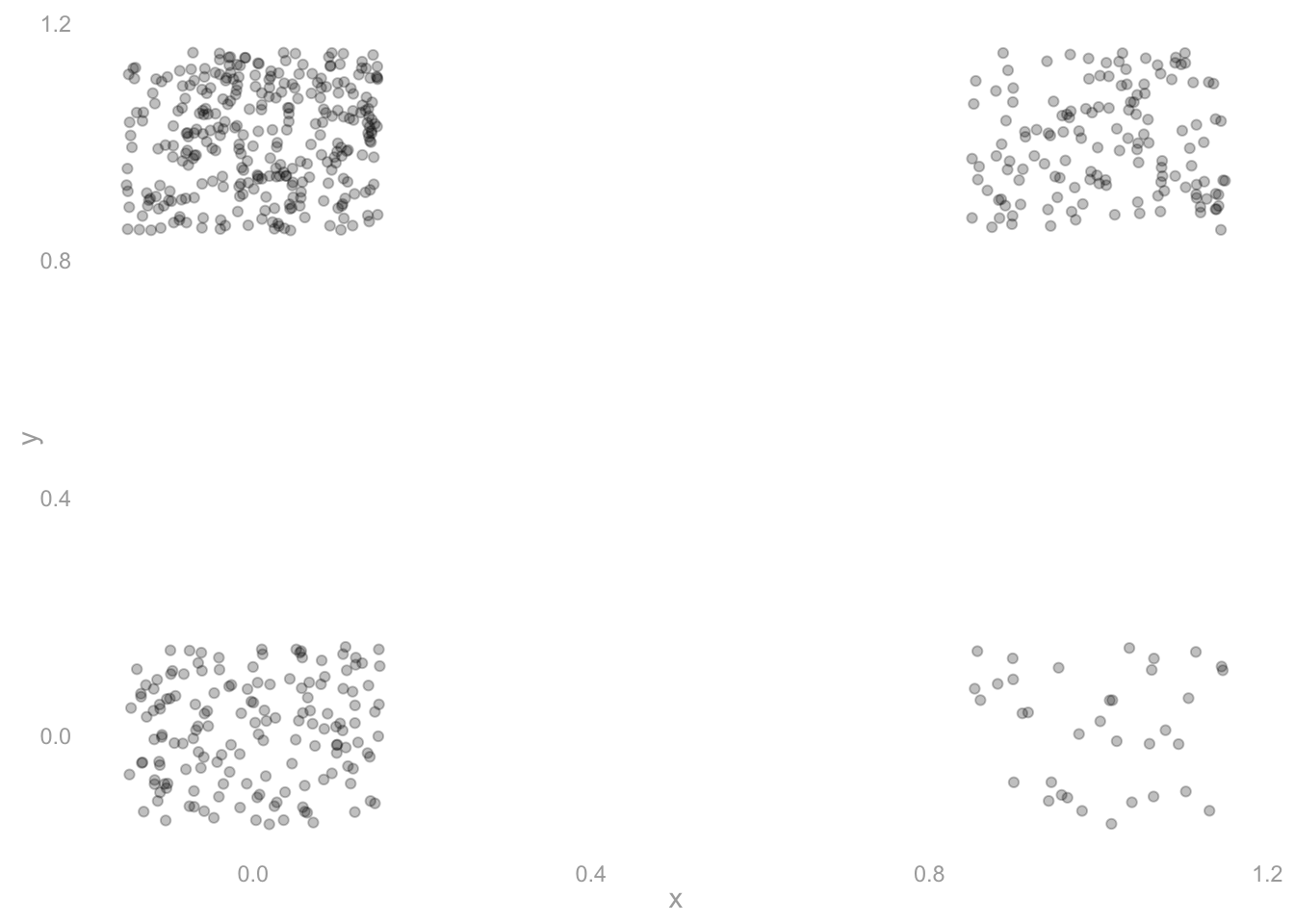
sam. Jitter separates overlapping points visually; it does not change the stored responses.
Bootstrap vs. Binomial
In class, we argued that for a binary response, the bootstrap sampling distribution of the sample frequency \(\hat\theta\) is our plug-in Binomial estimate of the sampling distribution: the distribution of the frequency of ones in \(n\) draws, with replacement, from a ‘population’ where that frequency is \(\hat\theta\)—our sample. Let’s confirm that empirically in our Georgia turnout poll, where Y is our sample of \(n=625\) responses.
SolutionSolution
resample = function(Y) {
1  I = sample(seq_along(Y), size=length(Y), replace=TRUE)
2  Y[I]
}
3estimator = function(Y) mean(Y)

4bootstrap.samples = rep(list(Y), 10000) |>
5  map(resample) |>
6  map_vec(estimator) |>
  with_seed()

ggplot() +
  geom_bar(aes(x=bootstrap.samples, y=after_stat(prop)), alpha=.3) +
7  geom_line(aes(x=(0:n)/n, y=dbinom(0:n, n, mean(Y)))) +
xlim(.6, .8)- 1
-
Sample positions within the observed sample, with replacement.
seq_along(Y)lists its positions. - 2
- Return the responses at those positions. This function returns one bootstrap sample.
- 3
- Keep the statistic separate from the sampling operation: this function turns one sample into one estimate.
- 4
- Make a list with 10,000 copies of the observed sample, one input per repetition.
- 5
-
Apply
resampleto each list element. The result is a list of bootstrap samples. - 6
- Apply the estimator to each sample and collect the scalar results in a numeric vector.
- 7
-
Convert counts to proportions for the horizontal axis.
dbinomsupplies the probability of each count under the plug-in Binomial distribution.
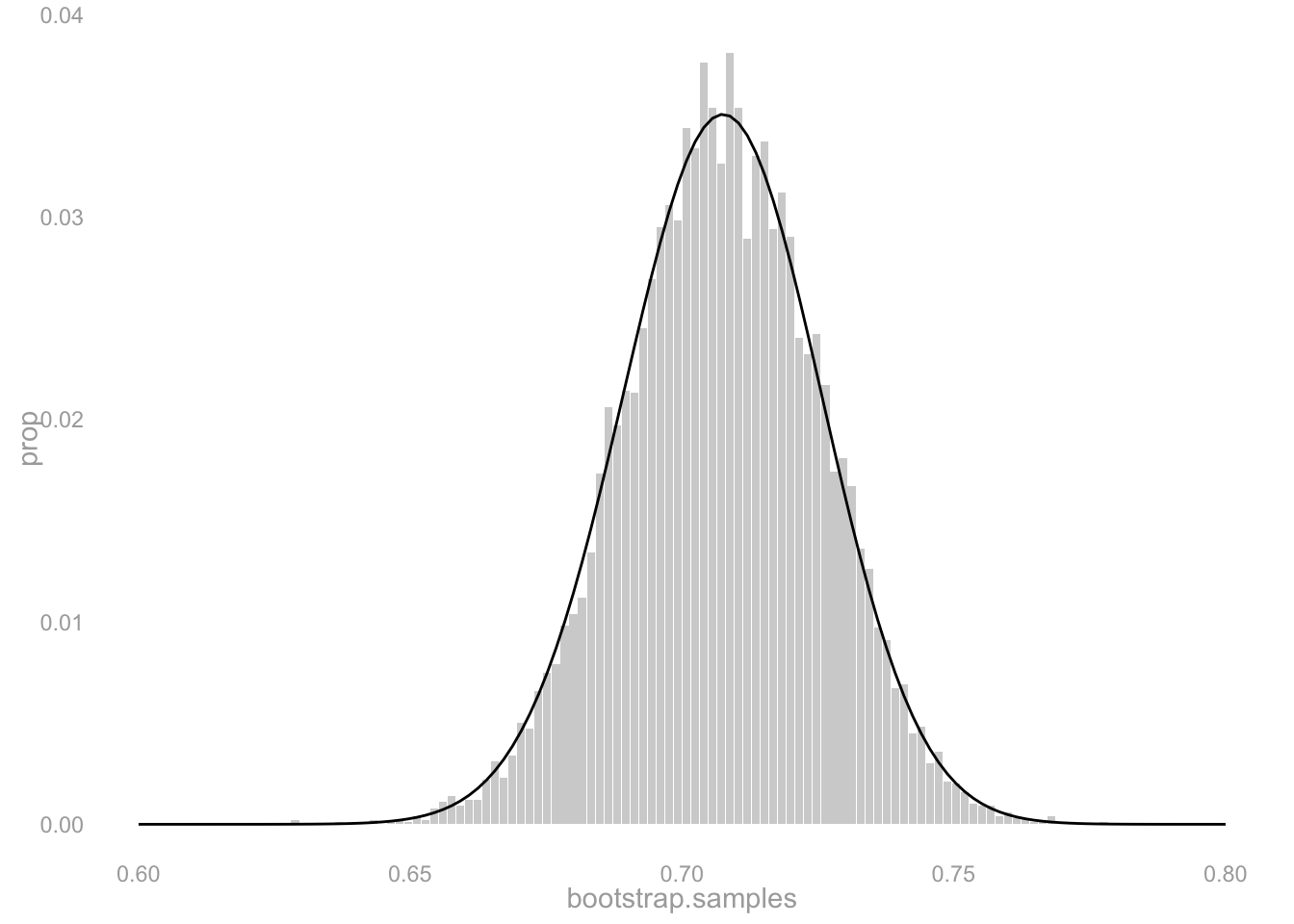
Yes. Up to simulation noise, the bars sit right on the curve. They should: each bootstrap draw is the frequency of ones in \(n\) draws with replacement from the sample, and the Binomial plug-in estimate is the distribution of exactly that.
Coverage: How Many Bootstrap Reps Do You Need?
The bootstrap gives us a confidence interval by simulating the sampling distribution of our estimate. But the simulation is itself a random draw—we only take a finite number of bootstrap samples. If we take too few, the interval we calibrate will be noisy, and its coverage might fall short of the 95% we promise. How many bootstrap reps are enough?
We can check this in a setting where we know the right answer. For a binary response, the exact sampling distribution of the sample frequency \(\hat\theta\) is Binomial, so we can compute an exact 95% confidence interval (the Clopper–Pearson interval) and compare it to the bootstrap interval.
Binary case
Our Georgia turnout population y has true frequency \(\theta = 0.698\). Draw 500 fresh samples of size \(n=625\) from this population. For each sample, compute two intervals:
- The exact Binomial 95% interval (Clopper–Pearson). In R,
binom.test(s, n)$conf.intreturns it. - A bootstrap 95% interval using your
bootstrap.intervalfunction with \(B\) bootstrap reps.
First use \(B=1000\). Compute the coverage of both the exact interval and the bootstrap interval across the same 500 samples, and report the two numbers. They should agree up to simulation noise.
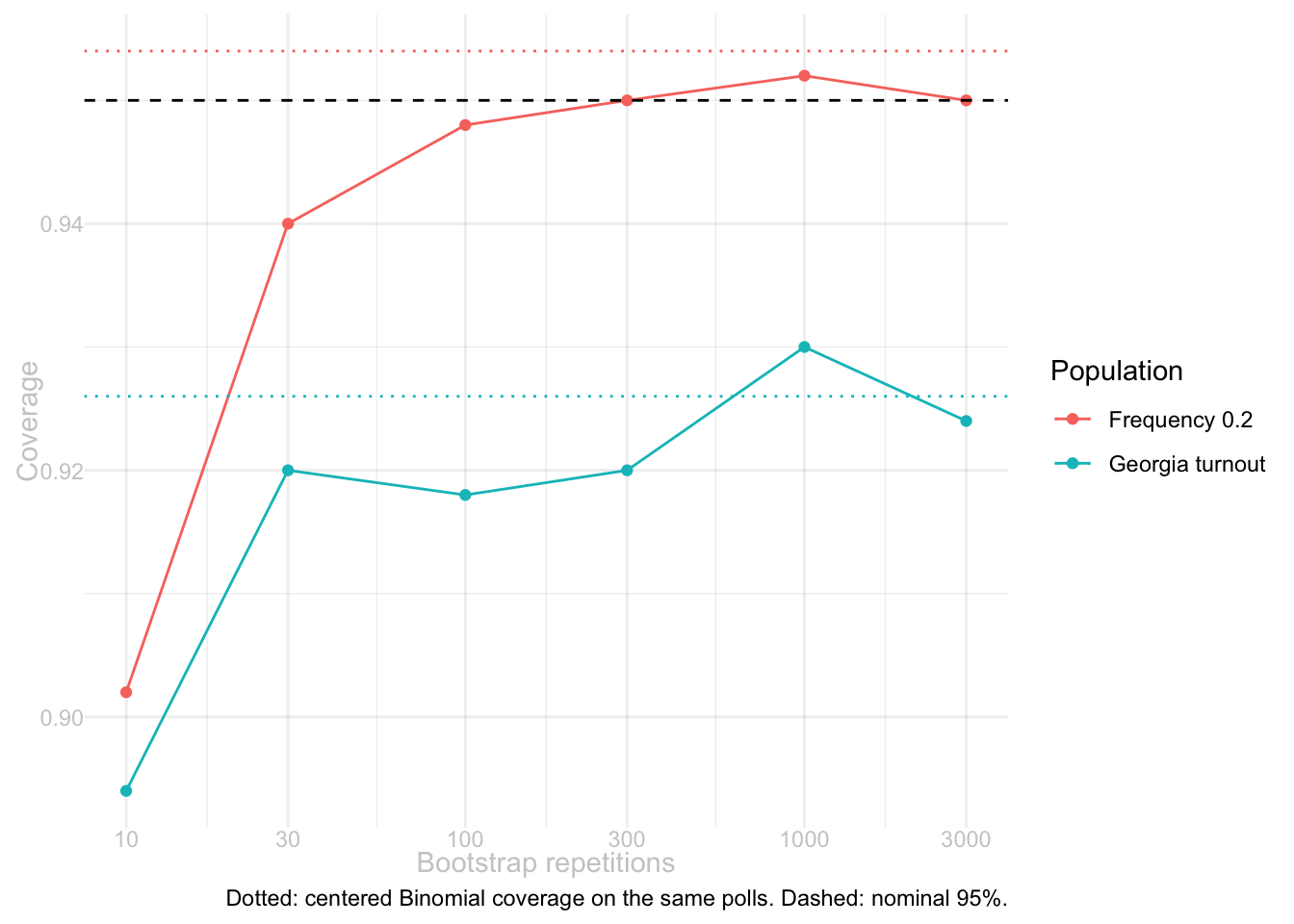
Then do this for several values of \(B\): 10, 30, 100, 300, 1000, 3000. For each \(B\), compute the fraction of the 500 samples whose bootstrap interval contains \(\theta\). Plot that coverage fraction against \(B\) on a log scale. Add a horizontal line at 0.95.
What do you see? How many bootstrap reps are needed before the bootstrap’s coverage matches the exact interval’s?
SolutionSolution
We need bootstrap.interval for this calculation, so define the function requested in Vote-History Part A first.
bootstrap.means = function(H, reps) {
  resample = function(H) {
1    I = sample(seq_along(H), size=length(H), replace=TRUE)
    H[I]
  }
2  rep(list(H), reps) |>
3    map(resample) |>
4    map_vec(mean)
}
bootstrap.interval = function(H, reps = 1000,
                              boot.means = bootstrap.means(H, reps)) {
5  H.bar = mean(H)
6  w = width(head(boot.means, reps), center=H.bar)
7  c(H.bar - w/2, H.bar + w/2)
}- 1
- Resample the supplied sample at its own size.
- 2
- Prepare one copy of the sample for each bootstrap repetition.
- 3
- Turn each copy into a fresh bootstrap sample.
- 4
- Calculate each bootstrap sample’s mean.
- 5
- Center the interval on the observed sample mean.
- 6
- Use the first requested number of bootstrap means to calibrate the width. By default the function draws them; supplying saved means lets us reuse the same replications in a comparison.
- 7
- Return the lower and upper endpoints in that order.
The assignment asks for bootstrap and Clopper–Pearson intervals. We also calculate the centered plug-in Binomial interval from class, as explained in the opening note. These three functions all return the lower and upper endpoints.
- 1
- Estimate the population proportion from this sample alone.
- 2
- Use the shared-code function to calibrate a centered width under the plug-in Binomial distribution, with this sample’s size and proportion.
- 3
- Place half that width on either side of the sample proportion.
- 4
-
Give
binom.testthe number of ones and the sample size, then extract its two interval endpoints.
Draw the 500 polls once, so all three intervals are compared on the same samples. Each bootstrap interval is calibrated from its own poll. Save 3,000 bootstrap means for each poll so Part A can use the first 1,000 and Part B can reuse the same replications.
population.mean = mean(y)
1binary.polls = rep(list(y), 500) |>
2  map(function(y) sample(y, size=n, replace=TRUE)) |>
  with_seed(28501)

binary.boot.means = binary.polls |>
  map(function(Y) bootstrap.means(Y, reps=3000)) |>
  with_seed(28502)

binary.covers = map2(binary.polls, binary.boot.means, function(Y, boot.means) {
3    exact.interval = clopper.pearson.interval(Y)
4    plug.in.interval = binomial.interval(Y)
5    boot.interval = bootstrap.interval(Y, reps=1000, boot.means=boot.means)
    data.frame(
6      centered.binomial = plug.in.interval[1] <= population.mean & population.mean <= plug.in.interval[2],
      clopper.pearson = exact.interval[1] <= population.mean & population.mean <= exact.interval[2],
      bootstrap = boot.interval[1] <= population.mean & population.mean <= boot.interval[2]
    )
  }) |>
7  list_rbind()

binary.comparison = binary.covers |>
8  summarise(across(everything(), mean))
knitr::kable(binary.comparison, digits=3)- 1
- Make 500 inputs for the sampling function. These inputs are the population, unlike the sample used inside the bootstrap.
- 2
- Draw one fresh poll from the population for each input. Store the resulting samples so all three methods use the same polls.
- 3
- Calculate the Clopper–Pearson interval from this poll.
- 4
- Calculate the centered plug-in Binomial interval from the same poll.
- 5
- Calculate the bootstrap interval from the same poll, using its first 1,000 saved bootstrap draws.
- 6
- Check both endpoints: an interval covers the population mean only if that mean lies between them. The next two columns apply the same check to the other intervals.
- 7
- Stack the one-row data frames into a table with one row per poll.
- 8
- Average each TRUE/FALSE column. R treats TRUE as 1 and FALSE as 0, so each average is a coverage fraction.
| centered.binomial | clopper.pearson | bootstrap |
|---|---|---|
| 0.926 | 0.934 | 0.93 |
These are pretty close to the nominal level of 95%. They’re a bit under, but we are, of course, only using 500 polls so our coverage calculation is approximate. Let’s see what happens when we vary the number of bootstrap replications. It should converge to the Binomial coverage probability because each replication we are averaging is, in fact, a sample from that Binomial.
Reuse the same 500 polls from Part A at every replication count. Within each poll, use the first 10, 30, 100, 300, 1,000, or 3,000 saved bootstrap means to calibrate the interval.
coverage.vs.reps = function(y, n, reps = c(10, 30, 100, 300, 1000, 3000), N = 500,
                           polls = NULL, saved.means = NULL) {
  population.mean = mean(y)
1  if (is.null(polls)) {
    polls = rep(list(y), N) |>
      map(function(y) sample(y, size=n, replace=TRUE))
  }
2  if (is.null(saved.means)) {
    saved.means = map(polls, function(Y) bootstrap.means(Y, max(reps)))
  }
3  map(reps, function(B) {
    covers = map2_lgl(polls, saved.means, function(Y, boot.means) {
4      interval = bootstrap.interval(Y, reps=B, boot.means=boot.means)
5      interval[1] <= population.mean & population.mean <= interval[2]
    })
6    data.frame(reps=B, coverage=mean(covers))
  }) |>
    list_rbind()
}- 1
- Draw the polls once, unless we supplied polls already drawn in Part A. Keep these polls throughout the comparison.
- 2
- Likewise, draw and save the bootstrap means once per poll, unless we supplied saved means.
- 3
- Repeat the coverage calculation at each requested replication count.
- 4
- Calculate the interval from this poll and its first B saved bootstrap means.
- 5
- Check whether that interval covers the population mean.
- 6
- Average over the same polls and return one row per replication count.
binary.coverage = coverage.vs.reps(y, n, polls=binary.polls,
                                   saved.means=binary.boot.means)
y.twenty = rep(c(0, 1), c(4, 1))
twenty.polls = rep(list(y.twenty), 500) |>
  map(function(y) sample(y, size=n, replace=TRUE)) |> with_seed(28504)
binary.coverage.twenty = coverage.vs.reps(y.twenty, n, polls=twenty.polls) |>
  with_seed(28505)

binomial.guides = data.frame(
  population=c("Georgia turnout", "Frequency 0.2"),
  coverage=c(binary.comparison$centered.binomial,
    mean(map_lgl(twenty.polls, function(Y) {
      interval = binomial.interval(Y)
      interval[1] <= mean(y.twenty) & mean(y.twenty) <= interval[2]
    })))
)

binary.curves = bind_rows(
  mutate(binary.coverage, population="Georgia turnout"),
  mutate(binary.coverage.twenty, population="Frequency 0.2")
)
knitr::kable(binary.curves, digits=3)

ggplot(binary.curves, aes(x=reps, y=coverage, color=population)) +
  geom_point() + geom_line() +
  geom_hline(data=binomial.guides, aes(yintercept=coverage, color=population),
             linetype="dotted") +
  geom_hline(yintercept=.95, linetype="dashed") +
  scale_x_log10(breaks=c(10, 30, 100, 300, 1000, 3000)) +
  labs(x="Bootstrap repetitions", y="Coverage", color="Population",
caption="Dotted: centered Binomial coverage on the same polls. Dashed: nominal 95%.")- 5
- Select tested repetition counts whose observed coverage lies in the requested band.
- 6
- Report the first tested count in the band, or explicitly say that none of the tested counts entered it.
band.summary = data.frame(
  population=c("Georgia turnout", "Frequency 0.2"),
  first.reps.in.band=map_chr(list(binary.coverage, binary.coverage.twenty), function(result) {
5    in.band = result$reps[.945 <= result$coverage & result$coverage <= .955]
6    if (length(in.band)) as.character(min(in.band)) else "none tested"
  })
)
knitr::kable(band.summary)| reps | coverage | population |
|---|---|---|
| 10 | 0.894 | Georgia turnout |
| 30 | 0.920 | Georgia turnout |
| 100 | 0.918 | Georgia turnout |
| 300 | 0.920 | Georgia turnout |
| 1000 | 0.930 | Georgia turnout |
| 3000 | 0.924 | Georgia turnout |
| 10 | 0.902 | Frequency 0.2 |
| 30 | 0.940 | Frequency 0.2 |
| 100 | 0.948 | Frequency 0.2 |
| 300 | 0.950 | Frequency 0.2 |
| 1000 | 0.952 | Frequency 0.2 |
| 3000 | 0.950 | Frequency 0.2 |
| population | first.reps.in.band |
|---|---|
| Georgia turnout | none tested |
| Frequency 0.2 | 100 |
The last table reports the first tested rep count whose observed coverage falls between 0.945 and 0.955 for each population. The curve need not be monotone: both the polls and the bootstrap draws are random. With 500 polls, coverage near 0.95 has simulation standard deviation \(\sqrt{.95(1-.95)/500} \approx .01\), larger than the requested tolerance of .005. So a point inside that band is not evidence that its true coverage is within .005 of 0.95. More bootstrap draws reduce noise in calibration; more polls are needed to measure coverage more precisely.
Checking Coverage in the Vote-History Example
Where the bootstrap earned its keep in class was the categorical response: vote history, the number of the last 5 elections each person voted in. There’s no nice parametric form for the sampling distribution of its mean, so we bootstrapped instead. Here’s the population and sample from class: h is vote history for everyone in Georgia, and H is what we observe for the \(n=625\) people in our turnout sample.
set.seed(42)
h = rep(NA, m)
h[y == 1] = rbinom(sum(y == 1), size = 5, prob = 0.7)  # voters average ~3.5
h[y == 0] = rbinom(sum(y == 0), size = 5, prob = 0.3)  # non-voters average ~1.5
mu = mean(h)

H = h[J]
Our point estimate of the population’s average vote history \(\mu = 2.896\) is the sample mean \(\bar H = 2.901\), and we calibrate an interval around it using the bootstrap: give it arms spanning the middle 95% of its bootstrap sampling distribution. The 95% is a claim about repeated polling: if we ran our poll over and over, drawing a fresh sample each time and calibrating a fresh interval from it, about 95% of those intervals would contain \(\mu\). In real life we can’t check that claim—we get one sample, and we don’t know \(\mu\). In our simulation we can.
SolutionSolution
nonbinary.coverage = coverage.vs.reps(
1  y=h, n=n, reps=c(10, 30, 100, 300, 1000, 3000), N=500
) |> with_seed(28505)
knitr::kable(nonbinary.coverage, digits=3)

coverage.curves = bind_rows(
  mutate(binary.coverage, response="Binary turnout"),
2  mutate(nonbinary.coverage, response="Vote history")
)
3ggplot(coverage.curves, aes(x=reps, y=coverage, color=response)) +
  geom_point() + geom_line() +
  geom_hline(yintercept=.95, linetype="dashed") +
  scale_x_log10(breaks=c(10, 30, 100, 300, 1000, 3000)) +
labs(x="Bootstrap repetitions", y="Coverage", color="Response")- 1
- Reuse the same coverage function, supplying vote history as its population argument. Each setting uses 500 polls.
- 2
- Label the vote-history results before combining them with the binary results.
- 3
- Map the response label to color so both experiments can be compared at the same repetition counts.
| reps | coverage |
|---|---|
| 10 | 0.886 |
| 30 | 0.930 |
| 100 | 0.940 |
| 300 | 0.952 |
| 1000 | 0.956 |
| 3000 | 0.952 |
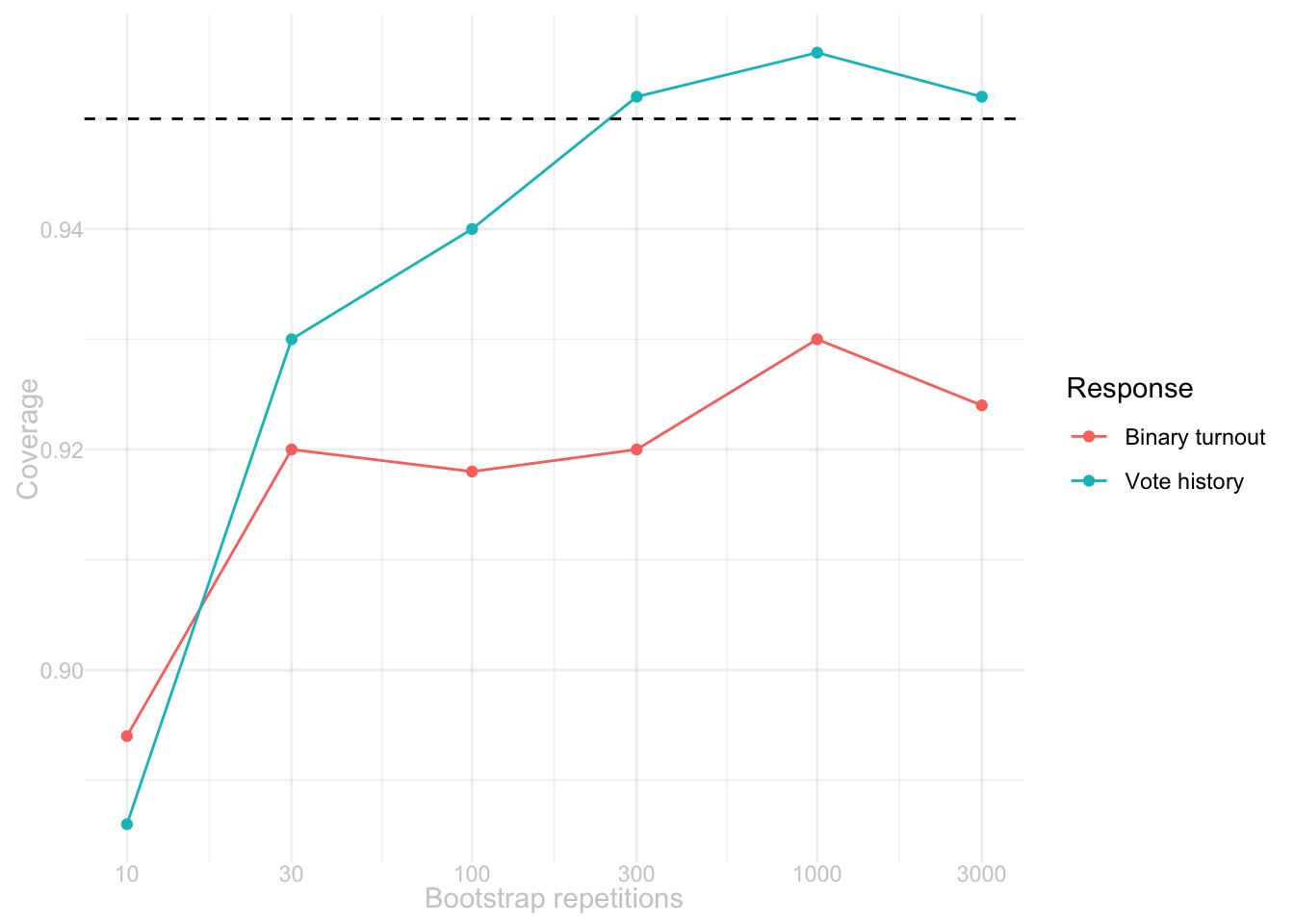
Compare the two curves at the same rep counts. There is no rule that a nonbinary response needs more bootstrap draws: the draws estimate the distribution of the sample mean in both cases. The differences in this plot also contain noise from using only 500 polls. A dip or a crossing of 0.95 is not a reliable difference in required rep counts. Increasing N would help distinguish the two coverage curves; increasing B alone does not remove that measurement noise.
Think, Don’t Calculate
You can answer everything in this section without computing anything. Find the right way to look at it, and the answer reads off.
Here are the sampling distributions of the sample frequency \(\hat\theta\) for two polls, each based on a sample of size \(n=25\) drawn with replacement. On the left, the population frequency is \(\theta = 0.1\). On the right, it’s \(\theta = 0.9\).
n.mirror = 25
scale.mirror = list(scale_x_continuous(limits=c(-.05, 1.05), breaks=seq(0, 1, by=.2)),
                    scale_y_continuous(limits=c(0, .28)),
                    labs(x='', y=''))
ggplot() +
  geom_col(aes(x=(0:n.mirror)/n.mirror, y=dbinom(0:n.mirror, n.mirror, .1)),
           fill='blue', color='blue', linewidth=.1, alpha=.2, width=1/n.mirror) +
  scale.mirror
ggplot() +
  geom_col(aes(x=(0:n.mirror)/n.mirror, y=dbinom(0:n.mirror, n.mirror, .9)),
           fill='blue', color='blue', linewidth=.1, alpha=.2, width=1/n.mirror) +
  scale.mirror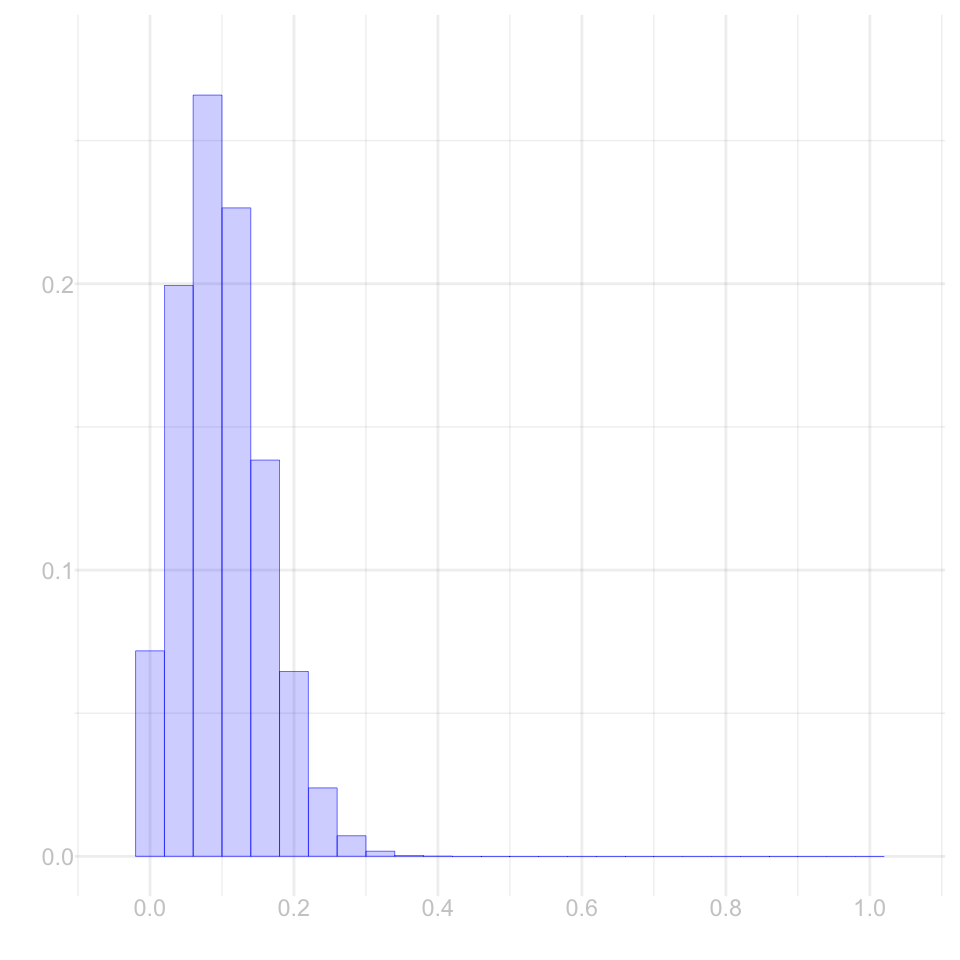
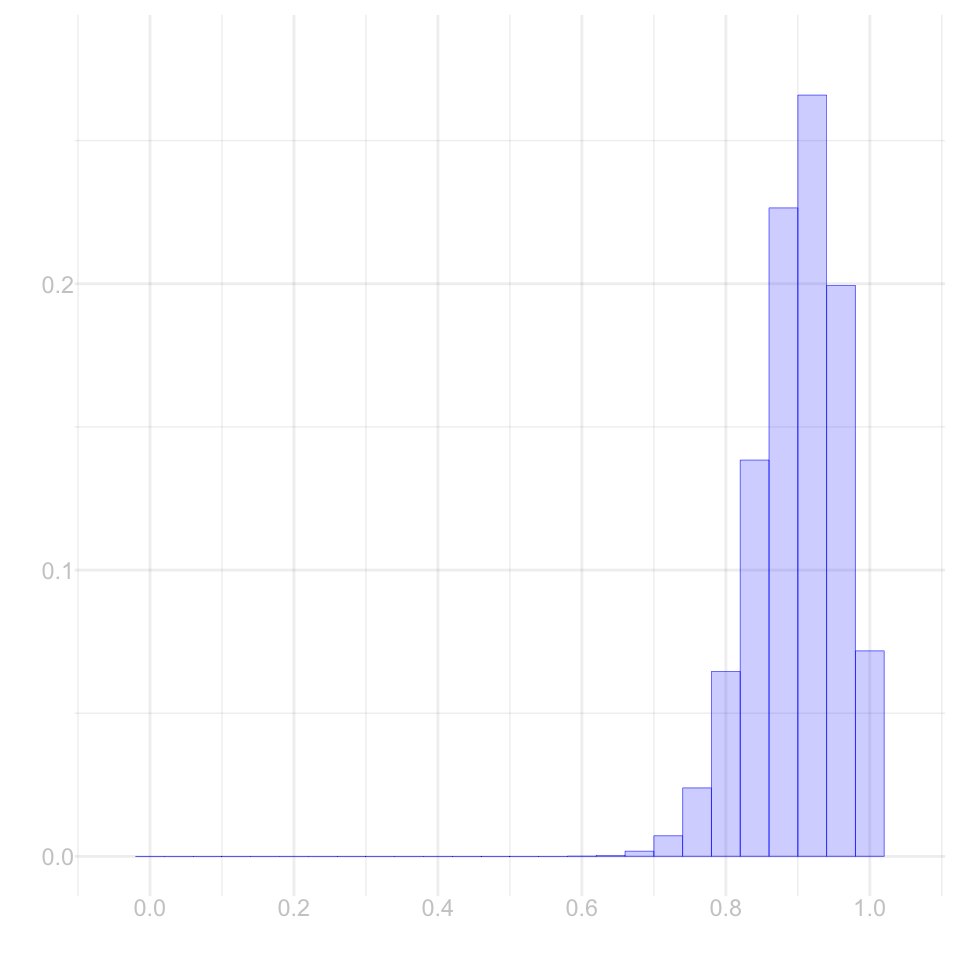
These are perfect mirrors of each other.
SolutionSolution
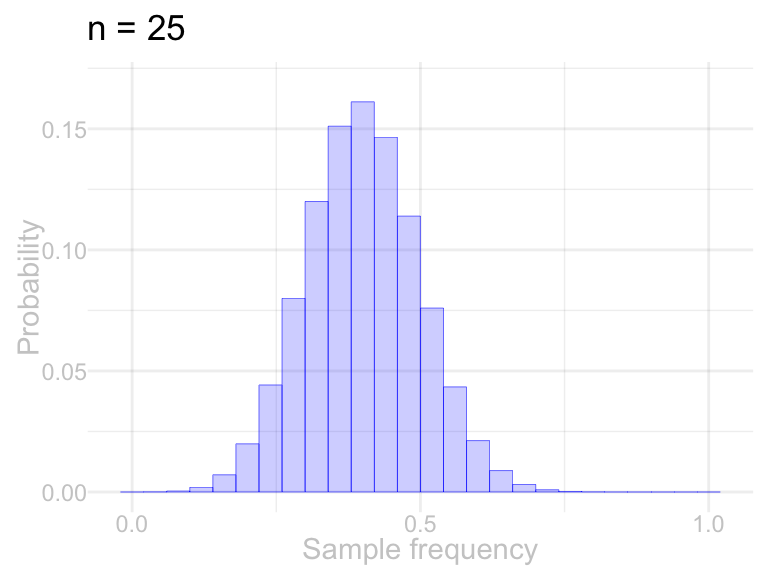
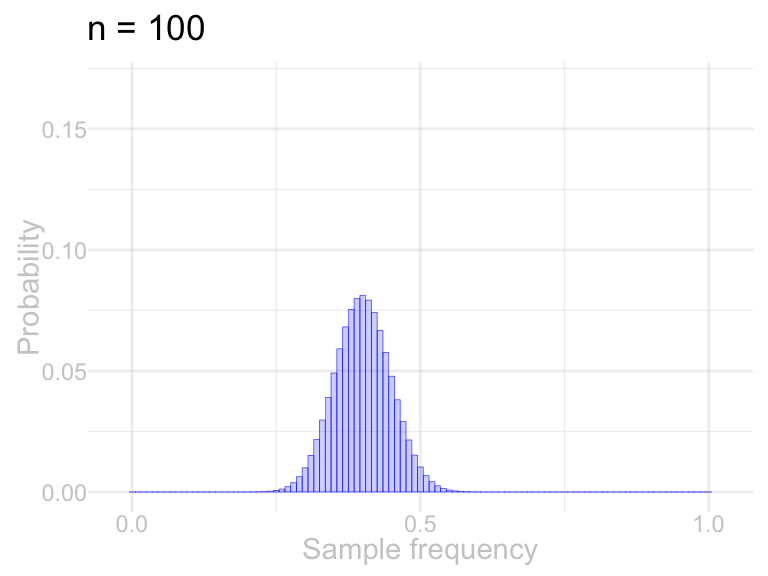
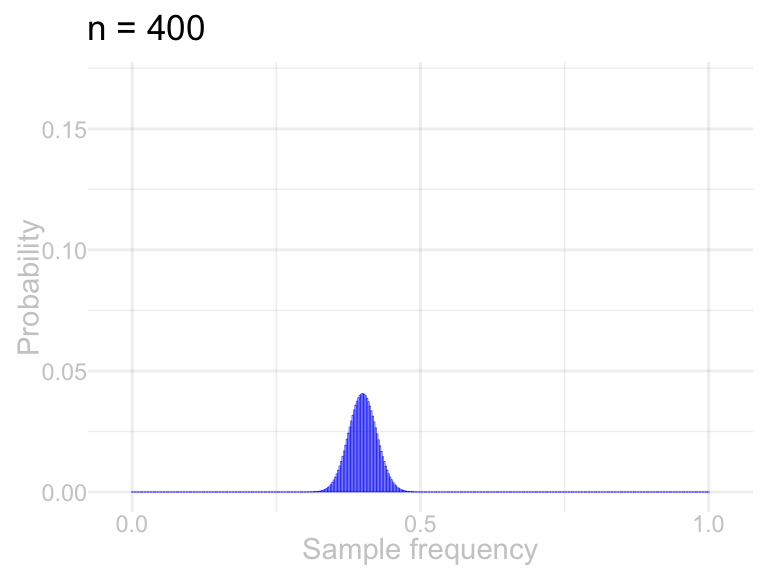
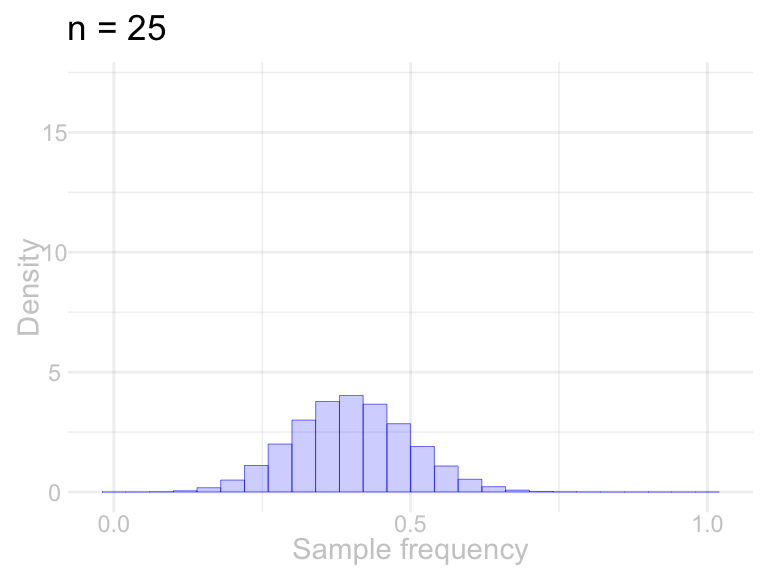
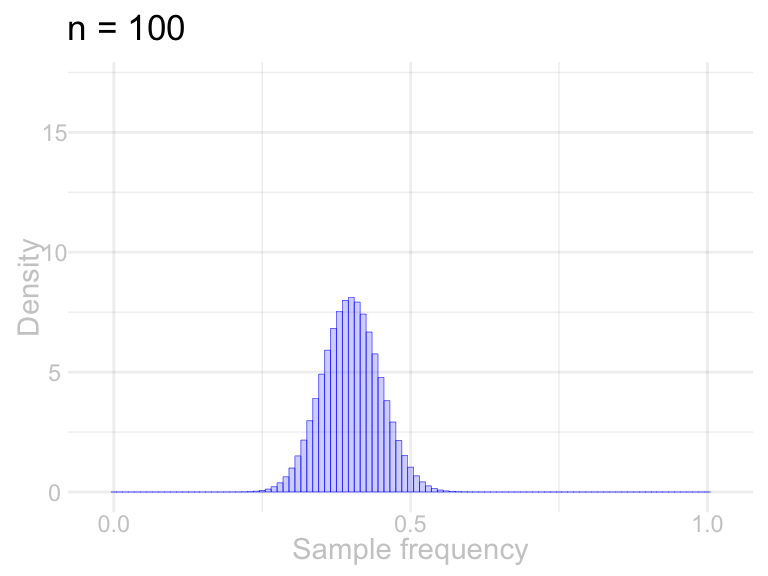
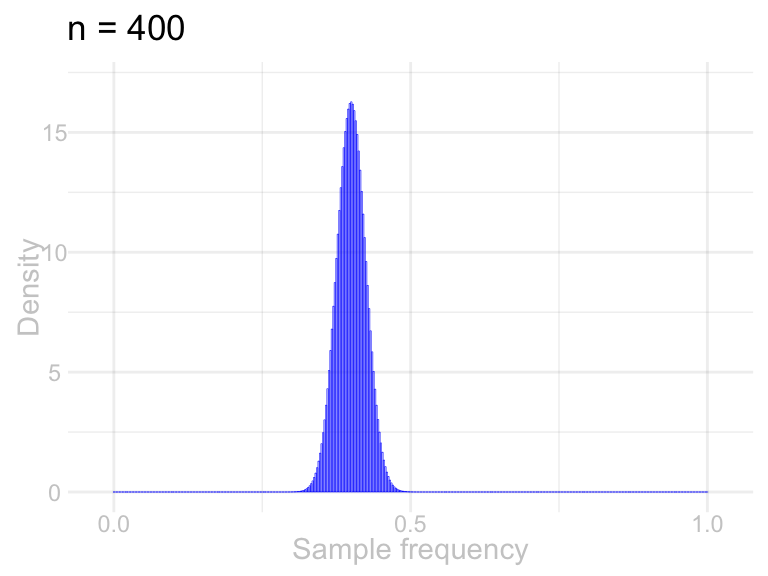
Each bar’s height was a probability: the chance that \(\hat\theta\) comes out to that exact value. At sample size \(n\), the possible values are \(0, \frac{1}{n}, \ldots, 1\)—so a bigger sample packs more possible values into the same interval. Near the center, probability is shared among more closely spaced values: shorter probability bars can accompany a narrower distribution. Bar height alone mixes concentration with the spacing between possible values.
The fix is to plot density: probability divided by the spacing between values, \(1/n\). Then it’s the bar’s area that is the probability, the overall level no longer depends on how finely the values are packed, and distributions at different sample sizes can sit on one set of axes. Drawn that way, what you see is the thing that’s actually changing: the distribution getting narrower around \(\theta\).
The columns below use the same sample-frequency estimator at three sample sizes, with population frequency \(\theta=0.4\). The top row plots probabilities; the bottom row divides those probabilities by the spacing \(1/n\) to plot density. The axes are shared within each row.
Code
sizes = c(25, 100, 400)
bar.data = map(sizes, function(n) {
  data.frame(frequency=(0:n)/n, probability=dbinom(0:n, n, .4), n=n)
})
probability.limit = max(map_dbl(bar.data, function(d) max(d$probability))) * 1.05
density.limit = max(map_dbl(bar.data, function(d) max(d$probability * d$n))) * 1.05
for (density in c(FALSE, TRUE)) {
  for (d in bar.data) {
    d$height = if (density) d$probability * d$n else d$probability
    print(ggplot(d, aes(x=frequency, y=height)) +
      geom_col(width=1/d$n[1], fill='blue', color='blue', linewidth=.1, alpha=.2) +
      scale_x_continuous(limits=c(-.025, 1.025), breaks=c(0, .5, 1)) +
      scale_y_continuous(limits=c(0, if (density) density.limit else probability.limit)) +
      labs(title=paste("n =", d$n[1]), x="Sample frequency",
           y=if (density) "Density" else "Probability"))
  }
}
There’s a moral here that outlives this plot. Two of the quantities we’ve been working with have a built-in problem: they change when the bookkeeping changes, even when the thing they describe doesn’t.
- A single value’s probability depends on how closely the possible values are spaced. That’s what happened in our plots. Comparing those heights alone does not separate the changing grid from the changing spread.
- A sum grows when the sample gets bigger. Ten times the observations means roughly ten times the sum, whether or not anything interesting is going on.
The cure is the same in both cases: divide out the bookkeeping. Divide probability by the spacing between values and you get density, which you can compare across plots. Divide a sum by \(n\) and you get an average, which you can compare across sample sizes. That’s why we plot density, and why we work with the frequency \(\hat\theta\) rather than the count. You do still have to keep track of which values are possible. But given that, density is the honest picture.
And it turns out this isn’t just a statistics habit. In visualization it’s called the principle of proportional ink: the ink a plot spends on a quantity should be proportional to the quantity, because area is what our eyes actually read.2 Density bars are that principle applied to distributions—so you’re picking up something here that isn’t just statistics.
Calculating Sampling Distributions
You’re canvassing a street of \(m=10\) houses, numbered 1 through 10, asking a Yes/No question. Unbeknownst to you, the people at houses 1, 2, 3, and 10 would say Yes and everyone else would say No. That’s a frequency of \(\theta = 2/5\), and the Yeses are neighbors: on a walk that loops from house 10 back to house 1, they’re four in a row.
Our usual scheme would be to roll the d10 \(n\) times and knock on the doors it names. The schemes below are different, and so are their sampling distributions. Both are small enough to calculate by hand: list every sample the scheme can produce, work out each one’s probability, and tally up the values of your summary.
SolutionSolution
One roll decides everything. Here are all ten possible samples, each with probability \(1/10\). A response of 1 means Yes and 0 means No.
| Starting house | Houses visited | Responses | Total Yeses |
|---|---|---|---|
| 1 | 1, 2, 3, 4 | 1, 1, 1, 0 | 3 |
| 2 | 2, 3, 4, 5 | 1, 1, 0, 0 | 2 |
| 3 | 3, 4, 5, 6 | 1, 0, 0, 0 | 1 |
| 4 | 4, 5, 6, 7 | 0, 0, 0, 0 | 0 |
| 5 | 5, 6, 7, 8 | 0, 0, 0, 0 | 0 |
| 6 | 6, 7, 8, 9 | 0, 0, 0, 0 | 0 |
| 7 | 7, 8, 9, 10 | 0, 0, 0, 1 | 1 |
| 8 | 8, 9, 10, 1 | 0, 0, 1, 1 | 2 |
| 9 | 9, 10, 1, 2 | 0, 1, 1, 1 | 3 |
| 10 | 10, 1, 2, 3 | 1, 1, 1, 1 | 4 |
Marginalize to the total \(S\): group rows with the same number of Yeses and add their probabilities.
| Total \(s\) | Starting houses | \(P(S=s)\) |
|---|---|---|
| 0 | 4, 5, 6 | \(3/10\) |
| 1 | 3, 7 | \(2/10\) |
| 2 | 2, 8 | \(2/10\) |
| 3 | 1, 9 | \(2/10\) |
| 4 | 10 | \(1/10\) |
walk.comparison = data.frame(
  yeses=rep(0:4, 2),
1  probability=c(c(3, 2, 2, 2, 1)/10, dbinom(0:4, 4, 2/5)),
2  scheme=rep(c("One roll and a walk", "Four independent rolls"), each=5)
)
ggplot(walk.comparison, aes(x=yeses, y=probability)) +
  geom_col(width=.8) +
3  facet_wrap(~scheme) +
  scale_x_continuous(breaks=0:4) +
labs(x="Number of Yeses", y="Probability")- 1
- Put the enumerated walk probabilities and the Binomial probabilities in one column.
- 2
- Give each set of five probabilities its sampling-scheme label.
- 3
- Make one panel for each scheme, using the same axes.
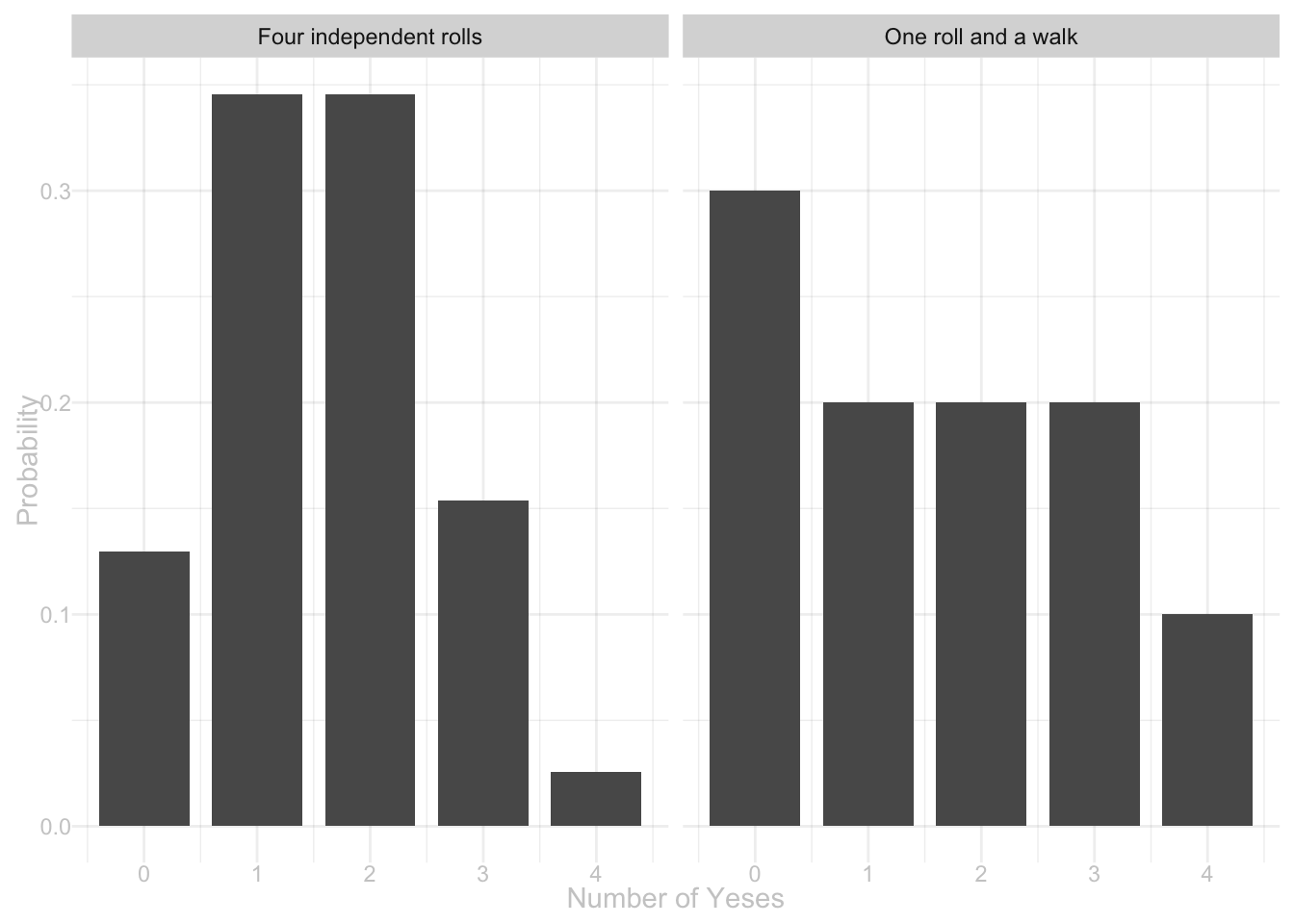
Under either scheme, each call has a uniform marginal distribution over the ten houses. In the walk, shifting a uniform starting house by one, two, or three houses keeps it uniform. Each response therefore has expectation \(\theta=2/5\), and linearity of expectation implies that the expected number of Yeses is \(4\theta=1.6\). Independence is not needed.
The spread is not the same. The one-roll distribution puts probability \(\frac{4}{10}\) on the extremes \(\{0, 4\}\); the Binomial puts about \(\frac{97}{625} \approx .16\) there. The street is why: the Yeses are four consecutive houses, so a single roll either lands you on the cluster and hears mostly Yeses or misses it and hears mostly Nos. Four independent rolls can’t be wiped out by one unlucky start—each gets its own chance to find a Yes. And that’s worth remembering: whether one-roll sampling works well depends on how the answers are arranged along the street, which is something the sampling distribution for our usual scheme doesn’t care about at all.
What Changes If You Change This
The derivation had two stages, and each one needed something to be true. Stage 1 needed every roll sequence to be equally likely, so that adding them up was counting them. Stage 2 needed every response sequence with the same sum to carry the same probability, so that adding those was counting too. Change the setup and you can ask which of those two survives.
Appendix: Throwing Rolls Away
The d12 has a fix, and it’s the obvious one. Instead of counting an \(11\) or a \(12\) as a ten, roll again. Keep rolling until you get a number you can use.
Every roll you keep is equally likely to be any of the ten, because the rule for throwing one away treats all ten usable faces alike—an \(11\) and a \(12\) go in the bin no matter who you were about to call. Conditional on being kept, symmetry therefore assigns probability \(1/10\) to each retained face. So stage 1 is counting again, \(\theta_1\) is the population frequency again, and the answer is the one we derived.
This procedure is called rejection sampling: use a tool that gives one distribution, discard outcomes outside the target, and keep a draw whose retained distribution is the one you want.
Footnotes
Here “perfect” means coverage of at least 95%. Each tail is kept as close to 2.5% as the discrete distribution permits without exceeding it; the available tail probabilities move in jumps.↩︎
The name comes from Carl Bergstrom and Jevin West; Claus Wilke’s Fundamentals of Data Visualization (2019) has a good chapter on it.↩︎